RAHWE People · Team
Everyone, their role and their reporting line.
Without it
Sound familiar?
The org chart lives in a slide deck.
Access rights do not match the structure.
Joiners and leavers miss steps.
What you get
Everything in People
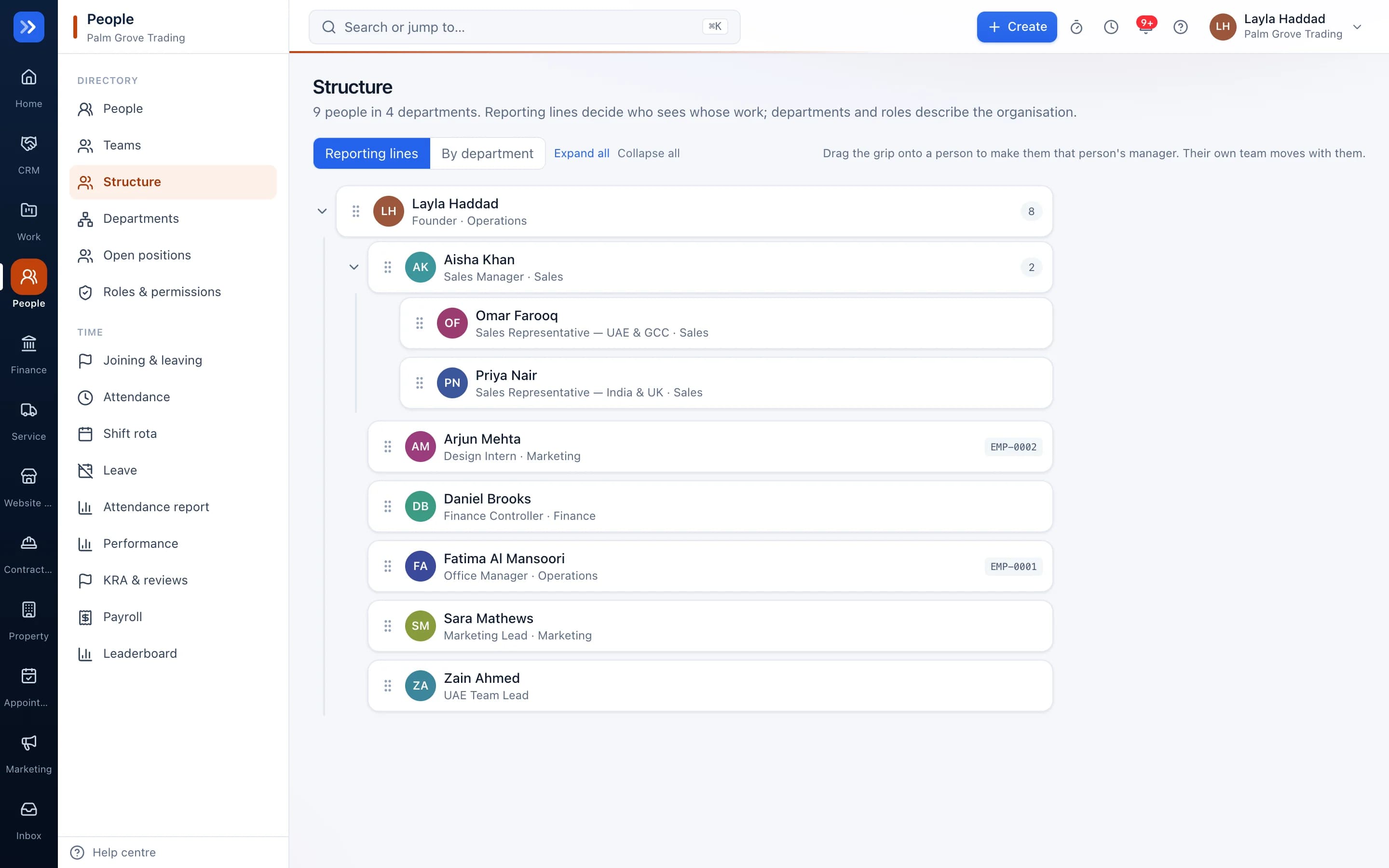
Org chart you can drag
Move people between managers or departments by dragging. Loops are refused automatically.
Open positions
Plan roles before you hire. Vacancies appear on the chart under the manager they will report to.
Roles and permissions
Fine-grained roles, per-person app access, and record visibility that follows reporting lines.
Joining and leaving checklists
Start automatically when someone joins or leaves, owned by their manager.
Attendance, leave, payroll
Check-in, leave approvals with balances, and payroll files for the UAE and India.
Private by default
Colleagues see work profiles. Dates of birth, addresses, emergency contacts and HR notes need a separate permission.
Shift swaps
A colleague accepts the swap, then the manager approves it.
Labour cost
See planned labour cost per day and week from pay records.
Performance
Goals, reviews and a leaderboard.
In action
Watch People at work
A real screen recording with a sample company.
How to use it
Up and running in 5 steps
The screen names match what you see in the app.
- 1
Add your team
People
Invite people or create their logins, with role, department and manager.
- 2
Draw the structure
People → Structure
Drag people on the org chart. Access follows the reporting lines.
- 3
Plan the week's shifts
People → Rota
Drag shifts onto people and publish. Everyone is told their shifts by app, email or WhatsApp.
- 4
Track time and leave
People → Attendance, Leave
Check-in with location, breaks and office radius. Leave goes to the manager, then HR.
- 5
Run payroll
People → Payroll
Prepare payroll from attendance and leave, with the UAE salary file and India PF and ESI.
Who uses it
Made for the people doing the work
HR
Keep structure, access and the employee lifecycle in one place.
Managers
Approve leave and see their team's attendance.
Employees
Request leave, see payslips and update their details.
How it flows
One step leads to the next
- 1Position opened
- 2Person invited
- 3Employee code issued
- 4Joining checklist
- 5Reporting line set
- 6Access follows the role
Works with
Better with the rest
Turn these on and they share the same customers, staff and records. Leave them off and People still works on its own.
Questions
Questions about People
Can a line manager see salaries?+
No. Pay records need the payroll permission, and personal details need the sensitive-data permission.
Can someone have a second manager?+
Yes, a dotted-line manager for day-to-day work. Access still follows the line manager.
Can someone on leave be put on the rota?+
No. RAHWE refuses to roster a person during their approved leave.